
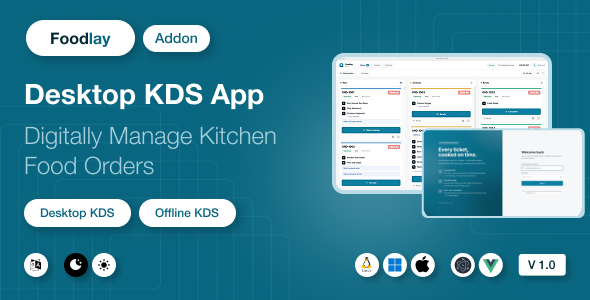
Foodlay KDS | Kitchen Display System Desktop Add-on
Original price was: $49.00.$8.00Current price is: $8.00.
Foodlay KDS — Kitchen Display System Desktop App
Foodlay KDS is a desktop Kitchen Display System for restaurants, cafes, cloud kitchens, and food businesses. It runs as a native app on Windows, macOS, and Linux and turns any kitchen screen into a live order board: orders from every channel — POS counter, website, and mobile app — land on a three-column board (New → Cooking → Ready) with one-tap bumping, new-order chimes, ticket-age timers, an all-day batch view, and KOT thermal printing. Every ticket is mirrored into a local SQLite database, so the board survives restarts and network drops, and status bumps queue locally and sync back the moment the connection returns.
⚠️ Requires the Foodlay Admin & Web Panel (separate purchase). This item is the kitchen display client only. It connects to a running installation of the Foodlay Admin & Web Panel — the Laravel-based server product, which is a separate purchase and is not included in this package. Without that server, the KDS cannot log in or receive orders. The documentation includes a dedicated “Connecting to Your Server” guide covering every configuration value with concrete examples.
Key Features
- Live order board — a three-column New / Cooking / Ready board that polls your server and diffs every cycle: new tickets chime and pulse until a chef acknowledges them, and status changes made elsewhere (admin panel, a second kitchen screen) reconcile automatically
- One-tap bumping — Accept → Start cooking → Ready → Complete, with the correct ending per order type (takeaway is picked from the counter, dine-in is delivered, delivery tickets wait for the rider). One-step Recall undoes an accidental tap, and any of today’s finished tickets can be recalled from History
- Cancellations you can’t miss — a cancelled order stays on the board under a red alarm overlay with its own distinct sound until a chef dismisses it; it is never silently removed while food may still be on the stove
- Ticket-age timers — each ticket ages neutral → amber → red at thresholds you set, and the clock is the server’s, so a kitchen PC with a wrong system time can’t hide a late order
- All-day view — aggregated item totals across every new and cooking ticket, so the line can batch-cook “14 × Chicken Biryani” instead of reading twenty cards
- Offline-resilient — the full board lives in a local SQLite mirror; when the network drops the screen keeps working, bumps are queued, and everything pushes automatically on reconnect with a clear connection pill on screen
- KOT thermal printing — clean kitchen tickets in large type (no prices), with variants, add-ons, and customer notes, printed on demand or auto-printed the moment an order arrives
- Priced invoice printing — a full customer receipt (items, add-ons, discounts, taxes, service charges, payment method and paid/unpaid state) pulled fresh from the server at print time, with the business name and address taken from your admin panel
- Branch scoping & filters — pick the kitchen’s branch and see only its orders (optionally including unassigned ones); filter by order type (delivery / takeaway / dine-in) and by source (POS / Web / App) so a station only sees what it cooks
- Built for a kitchen screen — fullscreen mode, three text-size steps for reading from across the pass, adjustable alert volume with repeating alerts for unacknowledged tickets, and a mute toggle
- Keyboard shortcuts —
Aall-day panel,Mmute,Ffullscreen,Rsync now - 6 UI languages — English, Bengali, Spanish, Arabic (full RTL), Hindi, French. The chosen language is also sent to your server, so item and add-on names print on tickets in the kitchen’s own language
- Admin or employee sign-in — sign in with an admin account, or with a limited kitchen-staff employee account that can only read orders and update their status. Optional two-factor step supported. The token stays in the app’s secure main process and never touches the browser layer
- White-label ready — app name, application ID, icons, and accent color are all configurable; the brand color re-themes the running app live from Settings
User Reviews
Be the first to review “Foodlay KDS | Kitchen Display System Desktop Add-on”
Related Products

Academy Lms Course Content AI Generator Addon

Flutterwave Payment Gateway for Perfex CRM 1.0.2

AI Chat GPT OpenAI – AIgency – SAAS and HTML 5 version
![PDF Tools [All in one] – High Quality PDF Tools – Next.js React Web Application – SaaS](https://codingtop.com/wp-content/uploads/2023/04/pdf_tools_high_quality_pdf_tools_nextjs_react_web_application_44924651.jpg)
PDF Tools [All in one] – High Quality PDF Tools – Next.js React Web Application – SaaS
AI Assistant module for UltimatePOS SaaS-Compatible 2.0


There are no reviews yet.