
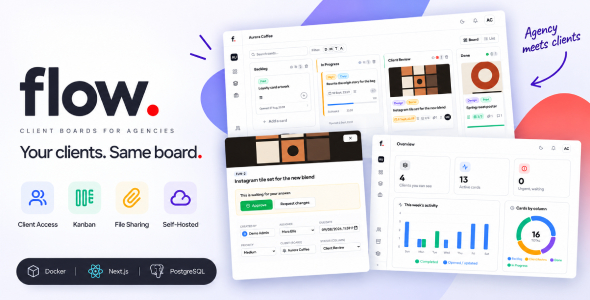
Flow | Client Portal and Kanban Project Management for Agencies
Original price was: $39.00.$6.00Current price is: $6.00.
Flow is a kanban project management app built for agencies and studios — and the client is in the room.
Every client gets a board. Every piece of work is a card. And when a design goes out for approval, the client signs in and sees exactly that: their board, the columns you switched on, and the comments you chose to share. Nothing else. No forwarding screenshots, no “did you see my email”, no paying for a seat on a SaaS just so a client can say yes.
Flow is self-hosted team collaboration software. One docker compose up on your own server, your data on your own disk, no subscription and no per-seat fee — for your team or for your clients.
Your clients get a login, not an invoice
This is the part other kanban scripts leave out. A client account in Flow is not a cheaper member account — it is a proper client portal, locked down by default.
- One board, theirs — a client sees the board you attached them to and no other. Other clients do not exist as far as their session is concerned.
- Columns you choose — switch visibility on per column. Your Backlog and In Progress stay internal; Client Review and Done are what they see.
- Comments you choose — every comment is internal unless you mark it shared. The team talks freely on the same card the client is looking at.
- They answer, they don’t edit — a client can read, comment, react, and approve or request changes. They cannot move a card, rename a column, or reach the team, the settings or anything else.
- Approval that moves the work — when a client approves, the card lands in Done with a completion date and the assignee is notified. When they ask for changes, it goes back to In Progress with their reason attached.
A board that knows what its columns mean
- Drag and drop kanban — cards between columns, columns into the order you want. Board view or list view, whichever suits the day.
- Columns carry meaning, not just a name — each column is queued, in progress, client review or done underneath. Call it “Waiting on Client” or “Müşteride” if you like; completion dates, statistics and the client’s view follow the meaning, not the words.
- Search and filter — find a card by title across the board, or narrow it down to one person’s work.
- Archive — finished clients and cards leave the board without leaving your records.
Cards with enough room for real work
- Rich descriptions — headings, lists, links and formatting, not a single-line text field.
- Subtasks with a progress bar — break a card into steps and watch 3/7 become 7/7.
- Labels from shared templates — define them once for the workspace, put them on any card.
- Due dates and priorities — with overdue cards called out where you will actually see them.
- Mentions and reactions — @someone and they hear about it; react to a comment instead of writing “ok”.
- A full activity log — who moved it, who assigned it, who changed the date, and when.
User Reviews
Be the first to review “Flow | Client Portal and Kanban Project Management for Agencies”
Related Products

PicoText – Simple Powerful Bulk SMS, MMS, WhatsApp Marketing Tool

![PDF Tools [All in one] – High Quality PDF Tools – Next.js React Web Application – SaaS](https://codingtop.com/wp-content/uploads/2023/04/pdf_tools_high_quality_pdf_tools_nextjs_react_web_application_44924651.jpg)
PDF Tools [All in one] – High Quality PDF Tools – Next.js React Web Application – SaaS

LaraBuild – Laravel Drag and Drop Page builder and Settings Builder Package
AI Assistant module for UltimatePOS SaaS-Compatible 2.0


There are no reviews yet.