
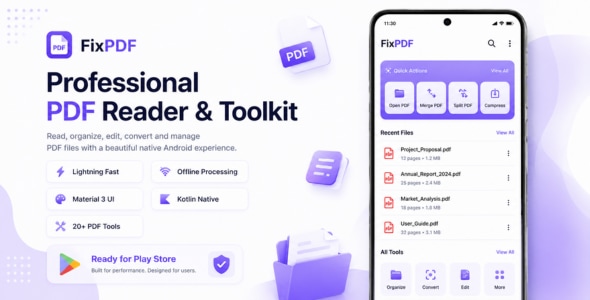
FixPDF – Ultimate Android PDF Tools & Document Utility App (Jetpack Compose, Kotlin, AdMob)
Original price was: $49.00.$7.00Current price is: $7.00.
FixPDF – All-in-One Android PDF Tools Suite
Ultimate PDF Editor & Utility App | Built on Native Kotlin & Jetpack Compose | Integrated AdMob Monetization | Targets current Google Play Store SDK requirements
FixPDF is a fully-featured, premium Android utility app designed for complete local, on-device PDF management. Built with modern coding patterns, clean architecture, and a gorgeous obsidian dark theme, it offers users 18 powerful PDF tools without requiring external servers, guaranteeing maximum privacy and performance.
This code template is ready to publish, fully structured for easy package renaming, color customizations, and instant AdMob configuration. It targets current Google Play Store SDK requirements to comply with Google Play Store rules.
Key Features:
- 18+ Premium PDF Utilities
- Modern Jetpack Compose UI
- Pre-Integrated AdMob Units (Banner, Interstitial, Native, App Open)
- Targets current Google Play Store SDK requirements & Scoped Storage Compliant
Compatibility & Requirements:
- Requires Android 8.1 (API level 27) or higher
- Targets Android 15/16 (API level 37) to comply with current Google Play Store requirements
18+ Powerful PDF Utilities Included
FixPDF is packed with a comprehensive toolkit that answers every PDF requirement:
1. Merge PDFs
Select multiple PDF documents and combine them into a single, organized PDF file with drag-to-reorder capabilities.
2. Split PDF
Split a large PDF file into multiple separate documents by specifying page numbers or individual ranges.
3. Compress PDF
Reduce the file size of PDF documents to save storage space and make sharing faster without losing essential text clarity.
4. Lock PDF (Add Password)
Secure confidential PDF files with robust user/owner passwords using secure, industry-standard AES-256 encryption.
5. Unlock PDF (Remove Password)
Remove passwords and encryption from protected PDFs to make access fast and friction-free.
6. Rotate Pages
Fix misaligned page orientations by rotating specific pages or the entire document (90°, 180°, 270°).
7. Remove Pages
Select and delete redundant, empty, or unnecessary pages from your PDF documents with ease.
8. Reorder Pages
Rearrange the sequence of pages within a PDF file using an interactive, visual grid layout editor.
9. Image to PDF
Convert images, camera photographs, and gallery screenshots into professional PDF files in seconds.
10. PDF to Image
Extract all embedded images from a PDF file or export entire PDF pages as high-quality PNG/JPG images.
11. Add Page Numbers
Insert sequential page numbers onto your documents. Choose header/footer placements and text formatting options.
12. Sign PDF
Draw signatures, resize, move, and stamp them onto any page or position of your PDF documents locally.
13. Add Watermarks
Add text or image watermarks behind page content. Customize transparency, scaling, rotation, and placement.
14. Edit Metadata
Manage file attributes by adding or editing the Title, Author, Subject, and Keywords tags inside the PDF structure.
15. HTML to PDF
Convert live web pages or local HTML files into offline PDF files directly using WebView printing.
16. Extract Text
Perform on-device text parsing and copy all plain text content from a PDF document to your clipboard.
17. Fill PDF Forms
Open interactive PDF documents to fill text fields, toggle checkboxes, and save filled documents.
18. Flatten PDF
Flatten annotations, form entries, and visual edits directly into the PDF content stream to prevent future edits.
User Reviews
Be the first to review “FixPDF – Ultimate Android PDF Tools & Document Utility App (Jetpack Compose, Kotlin, AdMob)”
Related Products

Stranger – Random Video Call with people – Gender Match – In-app purchase – Agora | iOS | Laravel

Challenge – Video and Live Streaming Challenge App,Chat,Gifts,Stories,Credits,Payouts| Android | IOS

ChatBot AI : ChatGPT iOS Full Applicaiton | Swift | ADMOB | Subscription Plan

Photo Collage Maker Full Ready IOS App


There are no reviews yet.